Project Overview
Review inquiry projects and move them between Follow-up, Won, and Lost.
Overview
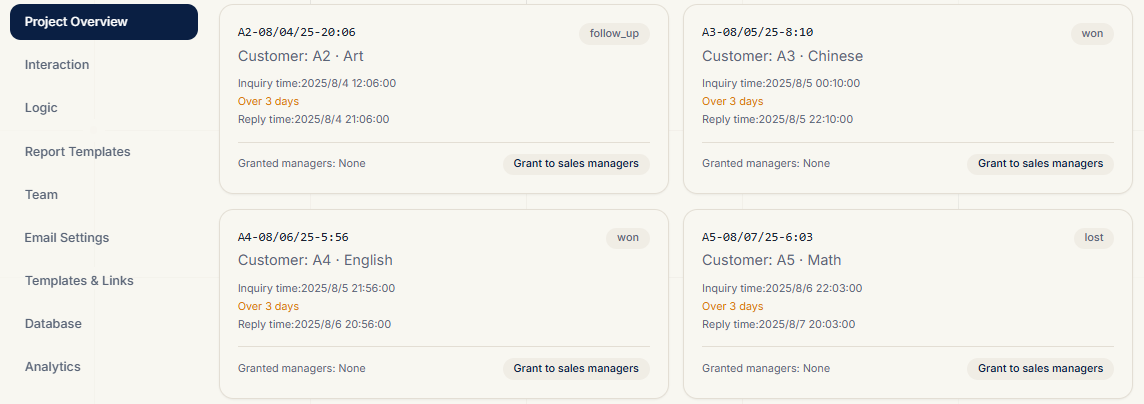
The Project Board displays every inquiry as a project card and is the main daily screen for the sales team.
Each card shows:
- Project number (customer-date-time, e.g.
ZhangSan-2026-08-12-143025) - Customer name and contact info
- Related theme
- Inquiry time
- Current status: Follow-up / Won / Lost
Status Transitions
| Current Status | Can Move To | Description |
|---|---|---|
| Follow-up | Won, Lost | Still being pursued |
| Won | — | Deal closed, flow ends |
| Lost | Follow-up | Can be reactivated |
Click the target status on a card to transition; changes are saved immediately.
Inquiry Limit Banner
When your inquiry count is near or at the plan limit, an upgrade banner appears at the top of the board to guide you to a higher plan.
Project Access Granting
Team admins can grant a project to a specific sales manager for viewing, enabling project-level data isolation. The granted manager sees the project after logging in.
Related Topics
- How do quizzes create projects? Quickstart
- How to configure notification emails? Report Templates