Report Templates
Configure internal notification, Summary, and yellow/red warning email templates.
Template Types
The Report Templates module manages 4 email templates. Each shows its To and CC recipients so you can verify the mail flow at a glance.
| Template | Trigger | To | CC |
|---|---|---|---|
| Internal Notification | New inquiry submitted | Sales manager of the theme | Sales director |
| Summary | After prospect completes quiz (shown on result page, not emailed) | Prospect | — |
| Yellow Warning | Project unresponded for ≥ 24h | Sales manager | Sales director |
| Red Warning | Project unresponded for ≥ 48h | Sales manager | Sales director |
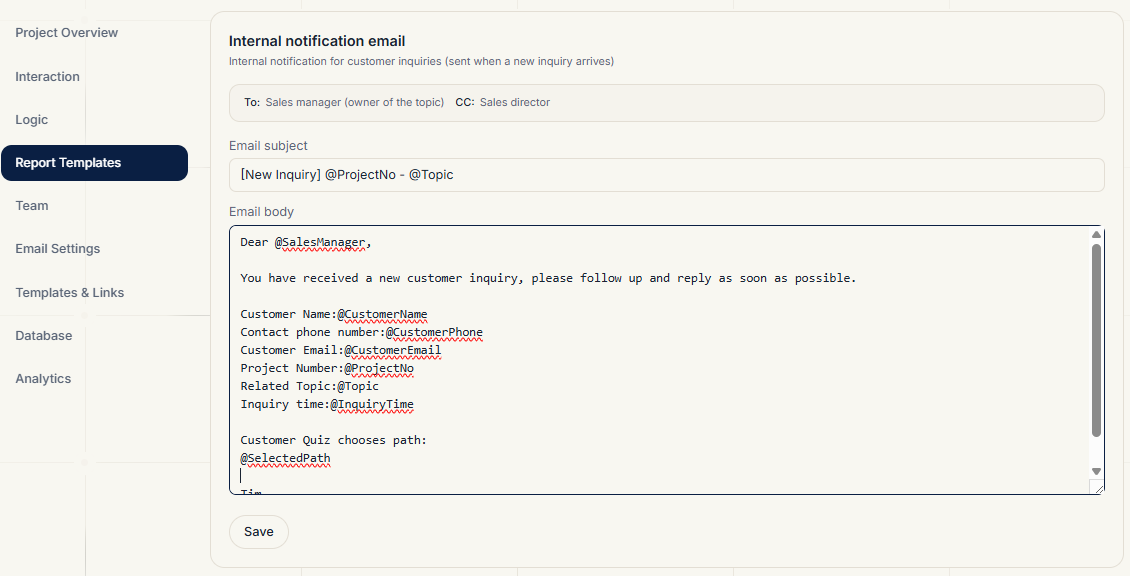
Editing Templates
For each template you can edit the subject and body. The body supports @variable placeholders that are replaced with real data when sent.
Available variables (names are fixed Chinese strings; they are replaced with real data when sent):
@项目编号— project number (customer-date-time)@客户名— customer name@客户邮箱— customer email@客户电话— customer phone@主题— the theme the prospect chose@选择路径— the prospect's full selection path@询盘时间/@持续时间— inquiry time and unresponded duration@销售经理— the responsible sales manager@今日询盘次数/@定价页链接— inquiry quota and upgrade link
Click Save to apply immediately; future emails use the new template.
Notes
- The Summary template content is what the prospect sees on the result page after completing the quiz
- The "Inquiry near/at limit" reminder template is internal to the platform and only adjustable by admins
- After editing templates, regenerate the link in Templates & Links before sharing
Related Topics
- Warning trigger hours: Email Settings
- Assigning themes to managers: Team