Logic
View the quiz as a decision tree, edit node contents, and preview quiz results.
Overview
The Logic tab renders the quiz as a decision tree, giving you a full view of the P1–P4 flow, and works together with the input table below for editing.
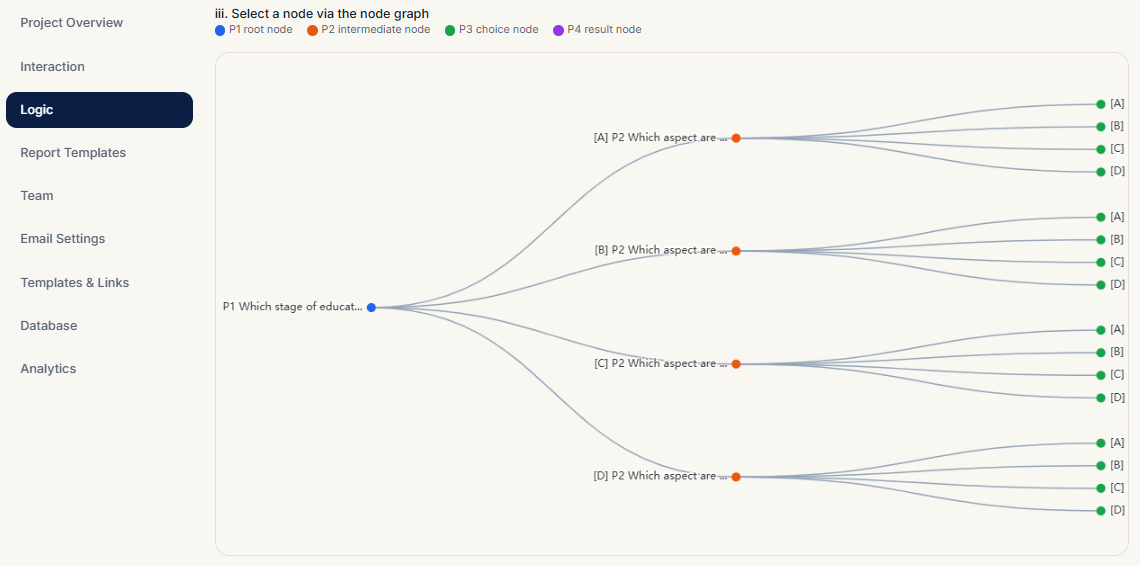
Decision Tree
- Rendered with ECharts across the whole quiz
- Nodes are color-coded by level:
| Level | Color | Meaning |
|---|---|---|
| P1 | Blue | First question |
| P2 | Orange | Branching questions |
| P3 | Green | Final choice (decides theme/manager) |
| P4 | Purple | Result page (no children) |
- Branches show the option label (e.g.
[A]). Click a node to locate and edit it in the table below
Editing with the Input Table
Below the tree is a node content table listing every node's questions and options:
- Click a tree node and the table scrolls to the matching row
- Edit question text directly in the table and save to the database
- Changes sync both ways with the Interaction editor
Previewing Quiz Results
Below the table there is an option box + Show button:
- Select a P3 node
- Click Show
- A phone-style preview of that node appears (identical to the Interaction preview)
Related Topics
- Phone-style editing and styles: Interaction
- What theme keywords do: Report Templates